
Proxyka
Proxyka routes chosen Windows programs through your SOCKS5 or HTTP proxy: the browser via another country, Telegram via a proxy, banking and games as usual.
Download for WindowsWindows 10 and 11, 64-bit · free · English and Russian
Open Proxyka-Setup.exe. If Windows shows “Windows protected your PC”, click More info → Run anyway.
In “Do you want to allow this app to make changes?” click Yes — needed for the network component.
Click Install. Proxyka opens and guides you through the setup.
Safe: Proxyka does not change Windows network settings. Interception works only while the app runs — quitting puts everything back. Uninstall removes the service, driver, firewall rule and autostart.
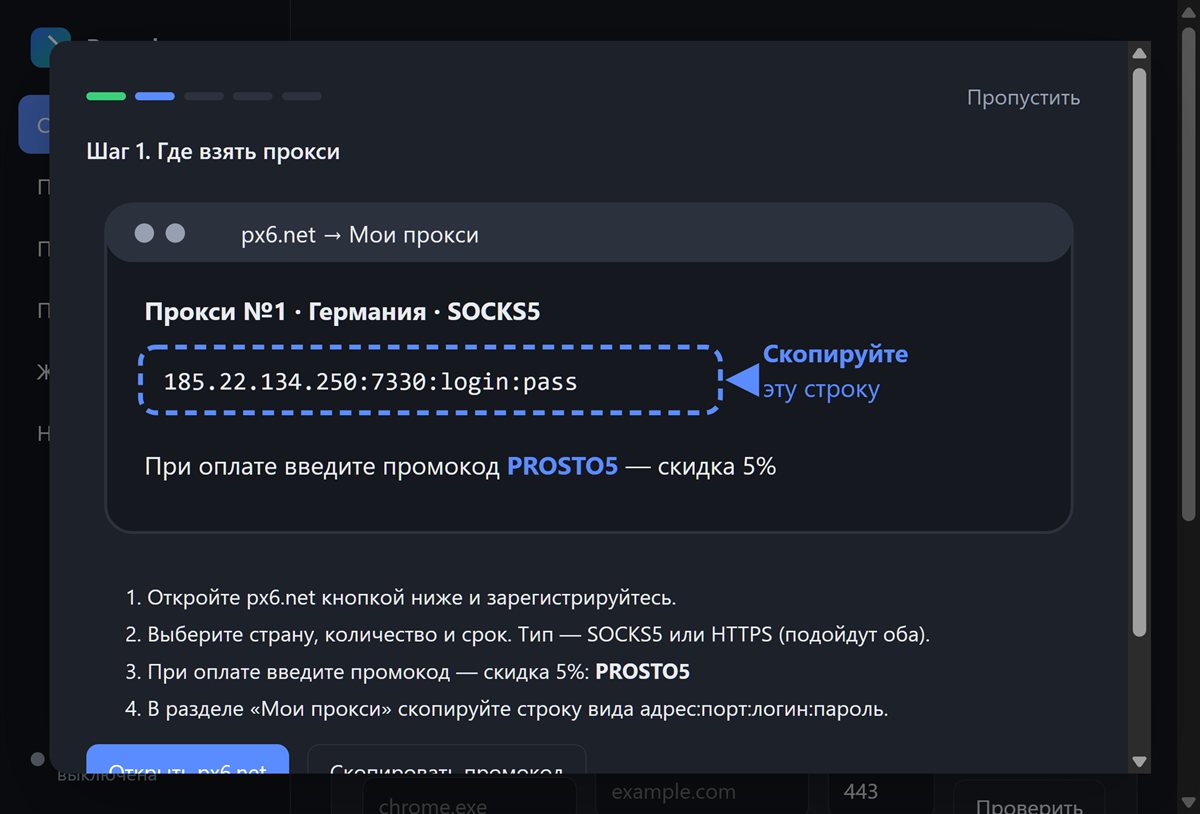
For example on px6.net — 5% off with coupon PROSTO5. Copy the host:port:login:password line.
Proxyka splits the line into fields and checks that the proxy reaches the internet.
All traffic or only chosen programs. Click “Turn on”.
Add your proxy, open “Programs” and click “Via proxy” next to the program. Everything else stays direct.
Yes — it solves the same task with a simpler setup, a wizard and px6.net import.
You choose: block the connection (no leaks), go direct, or switch to a backup proxy.